
Table of Contents
2.2 40-pin GPIO to Raspberry Pi and jumper settings (PT-1201 only)
This connector provides the connection to the Raspberry Pi over the standard 40-pin GPIO connector:

This connector is implemented as stack-through, i.e. up to two IOL HATs can be connected on top of each other. If the pins are not occupied by the connected IOL HAT, additional expansion boards can be connected via the stack-through connector.
Ensure the correct orientation of the GPIO connector. Misalignment or rotation can cause damage on the Raspberry Pi host and the IOL HAT. Pin 1 is marked and needs to match with the Raspberry Pi. Do not plug or unplug while powered.
Stacking of two IOL HAT
Two IOL HAT can be stacked on top of each other:

Raspberry Pi pin usage
The following pins are always in use when one or more IOL Hat modules are installed:
| Usage | Raspberry Pi Pin(s) |
|---|---|
| SPI: MISO (Master-In-Slave-Out) | 21 (SPI_MISO) |
| SPI: MOSI (Master-Out-Slave-In) | 19 (SPI_MOSI) |
| SPI: CLK (Clock) | 23 (SPI_CLK) |
| 3V3 | 1,17 |
| GND | 6,9,14,20,25,30,34,39 |
Port selection
The SDCI ports 1+2 or 3+4 are selected via jumper JP1. The following positions select the corresponding SDCI port:
| Use SDCI Port 1+2 | Use SDCI Port 3+4 |
|---|---|
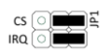 | 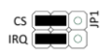 |
Jumper positions other than those shown are not valid.
If the devices are stacked, ensure that one device uses SDCI Port 1+2 and the other uses SDCI Port 3+4. Otherwise communication with the ports will not be possible.
The following pins are used depending on the port selection:
| Usage | SDCI Port 1+2 Raspberry Pi Pin # | SDCI Port 3+4 Raspberry Pi Pin # |
|---|---|---|
| SPI: CE (Chip Enable) | 24 (SPI_CE0) | Pin 26 (SPI_CE1) |
| Interrupt | 18 (GPIO24) | Pin 22 (GPIO25) |
For the SPI interface, the Raspberry Pi acts as “master”, the IOL HAT as “slave”. The SPI mode is Mode 0 (CPOL=0; CPHA=0). All pins in the GPIO connector are connected through without modification.