1.4 License installation
To run the software, a license needs to be present in the /license folder.
For obtaining the license file, the license key is required. If unsure, please open a ticket at support.pinetek-networks.com.
The license key can be found on the delivery note from your purchase.
The registration needs to be done once, no permanent online connection or offline registration at each start is required.
Obtain the license file
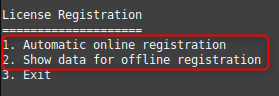
There are two options to get the license file:
Online registration
If the Raspberry Pi has internet access, the license key can be entered when running the binary and the license file will be generated, downloaded and stored automatically.
Offline registration
The CPU serial number and license key need to be entered at the license portal support.pinetek-networks.com/registration. In the next step, the license will be downloaded and needs to be transfered to the Raspberry Pi.
You can also create a new license.json file in the folder license/ and copy the contents
The filename needs to be license.json. Other files will not be recognized.
Please note that you need to repeat the registration if you accidentally delete the license file.