Table of Contents
2.2 Web interface and Pinebox configuration
Access the web interface
Once the Pinebox has started (“System”-LED solid green), you can access the Pinebox by entering the IP-Address or, if supported by the network, the devicename (in the format pinebox-XXXXX) into your webbrowsers address page:
 |
You will be redirected to the web interface which is available on port 18080.
Web interface sub-pages
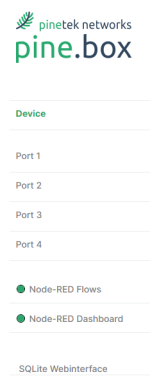
The web interface has different sub-pages:
- Device: Setting for the device like network settings, device configuration, store+restore configuration
- Port 1-4: Configuration of the 4 ports
- Node-RED Flows: Indicates if Node-RED is running, clicking leads to the Node-RED configuration page (opens in new window)
- Node-RED Dashboard: Indicates if Node-RED is running, clicking leads to the Node-RED dashboard (opens in new window)
- SQLite Webinterface: Link to the SQLite database web interface for viewing and editing the SQLite data (opens in a new window)
 |
Pinebox Settings
As you are already connected to the pine.box, you do not need to adjust the Network settings. If you anyways wish to do so, please check the corresponding section in the manual. Node-RED and Node-RED dashboards are enabled by default, so you will see a green circle left of the link, indicating that the service is running.
You can now connect and configure the first device!