Table of Contents
3.1 Power and Network Connections, Reset Button
The Pinebox has several connections and interfaces on the top and bottom side of the device to operate and access the device.
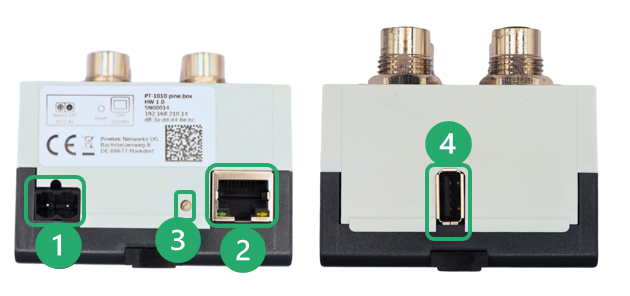
| Connection | Description |
|---|---|
| 1 - Power | Power Supply for the Pinebox |
| 2 - Ethernet | 1GBit wired Ethernet connection |
| 3 - Reset button | Resets the device |
| 4 - USB connection | USB Type A socket for future use |
1. Power connection
The used plug-in connector is an MSTBA2 type with 5,08mm spacing. The polarity is as shown in the following image:
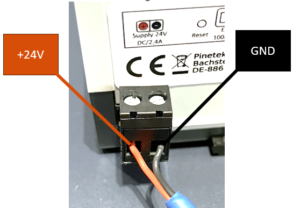
The Pinebox operates on 24V DC with a max. deviation for +/- 20% (i.e. 20,2V-26,8V). At maximum load, the device has a current consumption of 2,8A (at nominal voltage of 24V). The user shall ensure that the limits for safe operation of the device are maintained at power input.
Operating the device outside of these boundaries can damage the Pinebox (e.g., by overheating). Use only voltage sources that ensure that the above limits are kept.
Please note that the GND potential at the 24V input connector and the GND potential at the SDCI port connectors might differ due to internal filters.
2. Ethernet
The Ethernet connection established through a standard RJ45 connector with operations modes for 10/100/1000 MBit/s. The configuration of the Ethernet settings is done via the “Device” page on the web configuration page. The standard operation mode is DHCP client. If no DHCP server is present in the network, the fallback address printed on the label is used by the device.
The link status and activity of the Ethernet network is indicated over two LEDs located at the RJ45-connector:
- Link LED (green): Indicates an Ethernet Link on the port
- Activitiy LED (yellow): Indicates data activity on the Ethernet port
3. Reset button
To reset the device to the original Ethernet settings, please press the Reset-button for minimum 5 seconds. A successful reset is indicated with a red System LED. After the reset and a device restart has been performed, the default Ethernet settings are applied (DHCP client, if no DHCP client is available, fallback address is used).
4. USB
The USB connection can be used for LTE Connections via surfsick or host a WiFi dongle for WiFi access. Both functions can be configured over the “Device” page of the configuration interface.
Compatible devices
LTE Surfsticks
- ZTE MF79U
- ZTE MF833U1
USB WiFi dongles
- Netgear AV1200
- Netgear AC600
For futher compatibilty, please contact us at support.pinetek-networks.com