
Table of Contents
2.3 40-pin GPIO to Raspberry Pi and jumper settings
This connector provides the connection to the Raspberry Pi over the standard 40-pin GPIO connector:
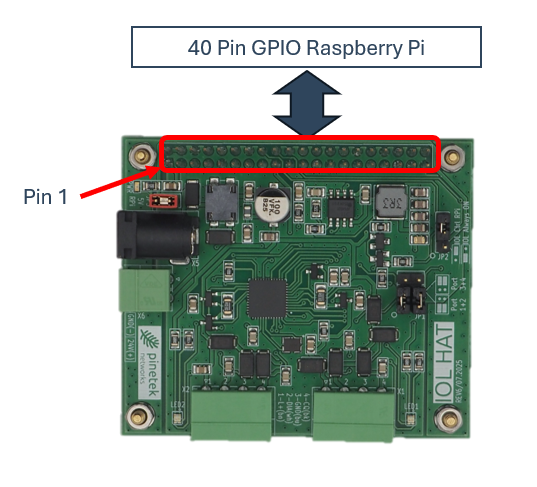
This connector is implemented as stack-through, i.e. up to two IOL HAT Pros can be connected on top of each other. Other additional expansion boards can be connected via the stack-through connector if the pins are not used by the IOL HAT Pro.
Ensure the correct orientation of the GPIO connector. Misalignment or rotation can cause damage on the Raspberry Pi host and the IOL HAT Pro. Pin 1 is marked and needs to match with the Raspberry Pi.
If any extensions (cooling modules, memory extensions, …) are mounted to the Raspberry Pi, the user needs to ensure that the clearance to the IOL HAT Pro is provided. Failure to do so might cause short circuits and damage of the IOL HAT Pro. If the clearance is not sufficient, please use additional raisers and standoffs.

Raspberry Pi pin usage
The following pins are always in use when one or more IOL HAT Pro modules are installed:
| Usage | Raspberry Pi Pin(s) |
|---|---|
| SPI: MISO (Master-In-Slave-Out) | 21 (SPI_MISO) |
| SPI: MOSI (Master-Out-Slave-In) | 19 (SPI_MOSI) |
| SPI: CLK (Clock) | 23 (SPI_CLK) |
| IOL Control (GPIO out) | 16 (GPIO 23); optional based on JP2 |
| 5V to Raspberry Pi | 2,4; optional based on JP3 |
| 3V3 | 1,17 |
| GND | 6,9,14,20,25,30,34,39 |
The following pins are used depending on the port selection:
| Usage | IOL Port 1+2 Raspberry Pi Pin # | IOL Port 3+4 Raspberry Pi Pin # |
|---|---|---|
| SPI: CE (Chip Enable) | 24 (SPI_CE0) | 26 (SPI_CE1) |
| Interrupt | 18 (GPIO24) | 22 (GPIO25) |
SPI mode
For the SPI interface, the Raspberry Pi acts as “master”, the IOL HAT Pro as “slave”. The SPI mode is Mode 0 (CPOL=0; CPHA=0). All pins in the GPIO connector are connected through without modification.