
pinebox:01_manual:6_counters-timers:6-1_counter-trigger
Table of Contents
6.1 Counters and Triggers
The Counters and Triggers function allows IO-Link process data signals to be monitored and used to increment or decrement software counters. Up to 8 triggers and 8 counters are available. The page is accessible via the Counter/Trigger entry in the side menu.
Engine Control
 |
| Control | Description |
|---|---|
| Counter and trigger status | Displays the current state: Running or Stopped |
| Enable counter and trigger | Toggle to start or stop the counter/trigger engine |
| Start at program launch | Toggle to start the engine automatically each time the application starts |
The engine must be running for triggers to evaluate and counters to accumulate. Autostart is saved persistently.
Counter Values
 |
Eight counters (Counter 1..8) are displayed. For each counter:
| Control | Description |
|---|---|
| Value | Current counter value (read-only, updates every second while engine is running) |
| Label | User-defined name for the counter for identification, enter label and click “Save” |
| Reset | Resets the counter value to 0 |
Trigger Configuration
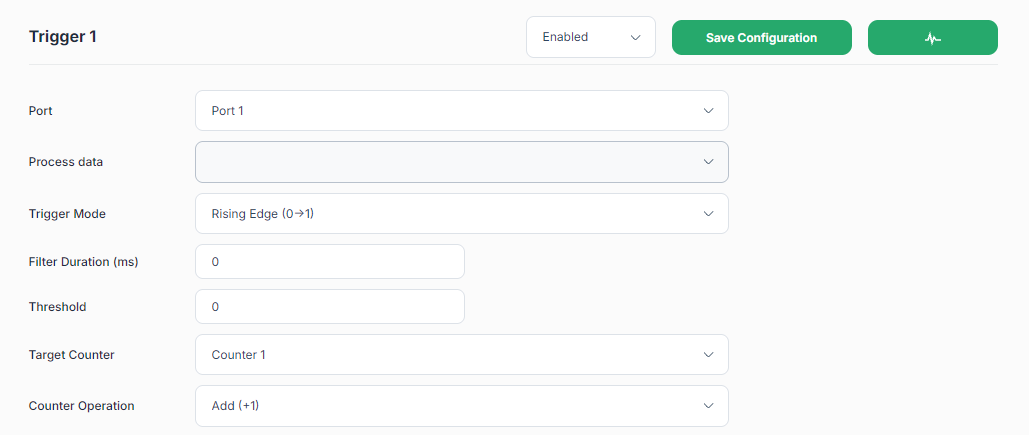 |
Eight trigger slots (Trigger 1..8) are available. Each trigger section has:
| Control | Action |
|---|---|
| Enabled / Disabled | Activates or deactivates this trigger without deleting its configuration. The state is saved persistently. |
| Save Configuration button | Saves all settings for this trigger to persistent storage |
| Scope button (waveform icon) | Opens the signal oscilloscope for this trigger's signal |
Trigger parameters
| Parameter | Description |
|---|---|
| Port | IO-Link port (Port 1..4) whose process data (PD) is monitored |
| Process Data | The specific process data variable to monitor (populated from the loaded IODD). The port needs to be correctly configured with a valid IODD. Process data is only captured when the port is powered. |
| Trigger Mode | The edge or threshold condition that fires the trigger (see table below) |
| Filter Duration (ms) | Minimum time the signal must satisfy the condition before triggering. Prevents counting noise or bounce. Range: 0..5000 ms |
| Threshold | Numeric threshold value for Threshold Above and Threshold Below modes |
| Target Counter | Which of the 8 counters this trigger increments or decrements. Multiple triggers can contribute to the same counter |
| Counter Operation | Add (+1) or Subtract (−1) |
Trigger modes
| Mode | Fires when |
|---|---|
| Rising Edge | Signal transitions from low to high over the threshold |
| Falling Edge | Signal transitions from high to low over the threshold |
| Both Edges | Signal transitions in either direction over the threshold |
A trigger only increments/decrements its target counter when the engine is running, the trigger is enabled and the port is powered. Disabled triggers are ignored by the engine.
pinebox/01_manual/6_counters-timers/6-1_counter-trigger.txt · Last modified: by 14.243.132.178