
Table of Contents
6.2 Timers
The Timers function measures the elapsed time between two configurable IO-Link signal events. Up to 8 independent timers are available, each with separate start and stop conditions. Statistics (count, minimum, maximum, average) are accumulated across all measurement cycles. The page is accessible via the “Timers” entry in the side menu.
Engine Control
 |
| Control | Description |
|---|---|
| Timer Engine Status | Displays Running or Stopped |
| Enable Timer Engine | Toggle to start or stop the timer engine |
| Autostart Engine | Toggle to start the engine automatically on each application start |
The engine must be running for timers to evaluate signals. Autostart is saved persistently.
Timer Values
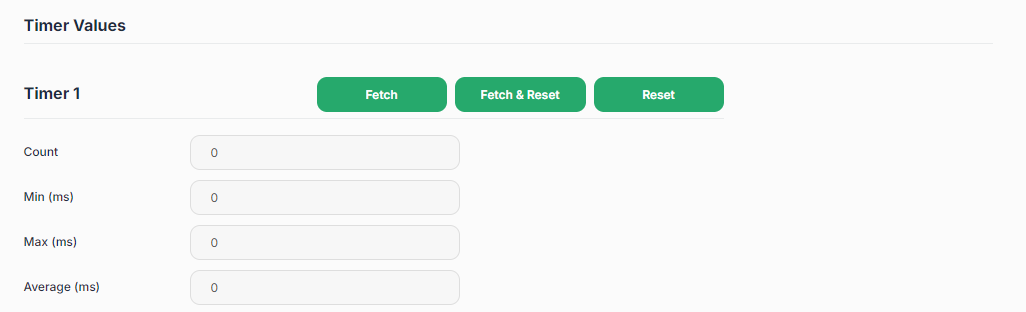 |
For each timer (Timer 1..8), the following statistics are shown. They accumulate while the engine is running.
| Value | Description |
|---|---|
| Count | Number of complete start-stop measurement cycles |
| Min (ms) | Shortest measured interval |
| Max (ms) | Longest measured interval |
| Average (ms) | Running average of all measured intervals |
Buttons per timer:
| Button | Action |
|---|---|
| Fetch | Reads current values from the engine without resetting |
| Fetch + Reset | Reads current values and resets all statistics to zero |
| Reset | Resets statistics to zero without reading |
Timer Configuration
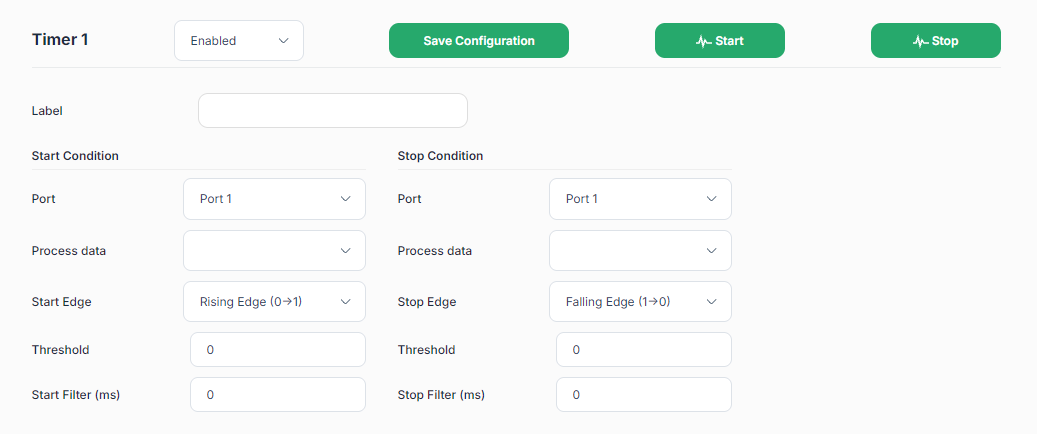 |
Each timer section has:
| Control | Action |
|---|---|
| Enabled / Disabled dropdown | Activates or deactivates this timer |
| Save Configuration button | Saves all settings persistently |
| Scope: Start (waveform icon) | Opens the signal oscilloscope on the start condition signal |
| Scope: Stop (waveform icon) | Opens the signal oscilloscope on the stop condition signal |
Timer parameters
| Parameter | Description |
|---|---|
| Label | User-defined name for the timer |
| Start Condition: Port | IO-Link port to monitor for the start event |
| Start Condition: Process Data | Process data variable to evaluate |
| Start Condition: Start Edge | Rising or Falling edge that starts the timer |
| Start Condition: Threshold | Numeric threshold for edge detection |
| Start Condition: Filter (ms) | Minimum duration the condition must hold before the start is accepted |
| Stop Condition: Port | IO-Link port to monitor for the stop event (can be a different port from start) |
| Stop Condition: Process Data | Process data variable to evaluate |
| Stop Condition: Stop Edge | Rising or Falling edge that stops the timer |
| Stop Condition: Threshold | Numeric threshold for edge detection |
| Stop Condition: Filter (ms) | Minimum duration the condition must hold before the stop is accepted |
A measurement cycle begins when the start condition fires and ends when the stop condition fires. If the stop fires before a new start, it is ignored. For the timer to measure data, the timer engine needs to be activated, the timer needs to run and the port(s) for start and stop condition need to be powered.