
pinebox:01_manual:6_counters-timers:6-3_scope
Table of Contents
6.3 Signal Oscilloscope
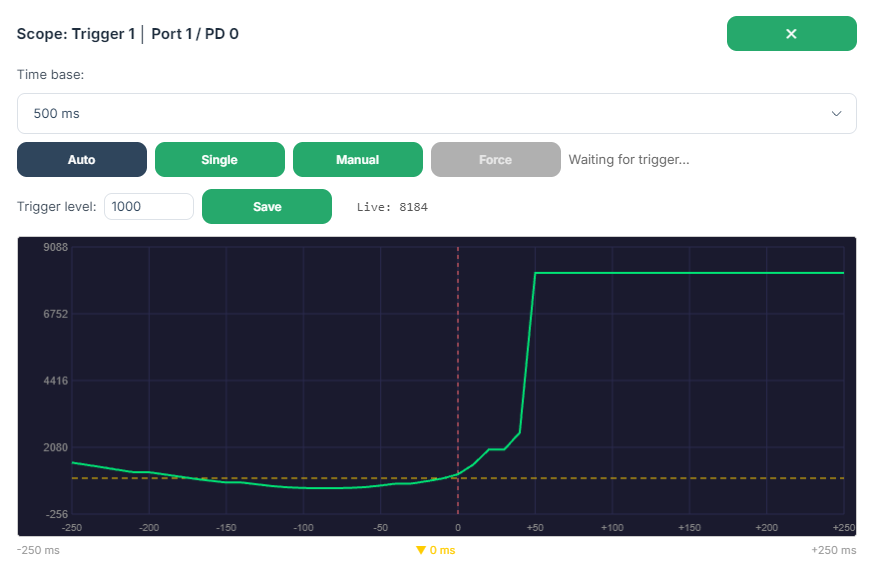
The signal oscilloscope is accessible directly from each trigger and timer configuration. It displays a real-time waveform of the selected IO-Link process data signal and allows the trigger level to be set visually. The scope reads from the same port and process data variable configured in the trigger or timer.
 |
Controls
| Control | Description |
|---|---|
| Mode: Auto | The scope re-arms automatically after each capture, continuously refreshing the waveform. |
| Mode: Single | Captures one waveform after the next trigger event, then holds. |
| Mode: Manual | Does not arm automatically; use the “Force” button to capture regardless of trigger condition. |
| Force button | Immediately captures the current signal. Available in Manual mode only. |
| Trigger Level | Adjusts the threshold at which the scope triggers. Changes take effect after immediately |
| Save | Explicitly saves the current trigger level back to the trigger or timer configuration on the settings page. |
| X (Close button) | Closes the scope and stops acquisition. |
Display
| Element | Description |
|---|---|
| Green trace | The signal waveform |
| Yellow horizontal line | Current trigger level |
| Red vertical line | Trigger point (t=0) |
Technical Notes
- The scope samples at a 10ms interval.
- A pre-trigger buffer shows signal history before the trigger event.
- Trigger level changes made in the scope are reflected in the trigger or timer configuration form after pressing “Save”.
pinebox/01_manual/6_counters-timers/6-3_scope.txt · Last modified: by 14.243.132.178