
pinebox:manual:3_connections-web-interface:3-2-ui-and-ports
Table of Contents
3.2 User interface and device ports
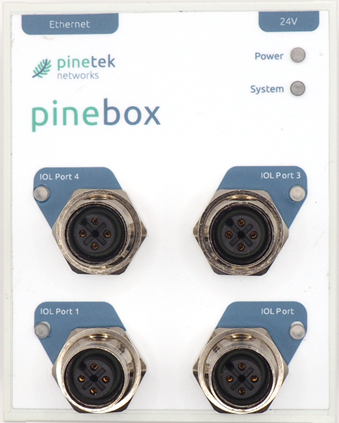
Device LEDs
The Pinebox has two LED indicators for the device status
Power LED
| Status | Description |
|---|---|
| OFF | No power supply, power supply out of specified range, internal power supply malfunction |
| Green | Power supply good |
System LED
| Status | Description |
|---|---|
| OFF | System not running |
| Blinking green | System starting (e.g. after initial power on, or reset of device) |
| Solid green | System running |
| Red | System error, please contact support |
| Blinking Red/Green | Software update ongoing |
Device Ports
The Pinebox has four ports that can connect to IO-Link compatible (SDCI) devices. The connection is established via a 4-pin M12 (female) connector with the follwing pin assignments (as per connector on the Pinebox):
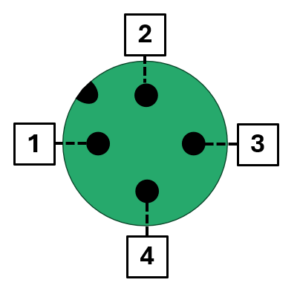
| Pin | Signal | Description |
|---|---|---|
| 1 | L+ | 24 Volt power supply to device (will be switched by Pinebox ). The Pinebox can deliver max. 500mA per port on this pin. The pin is overload protected. |
| 2 | I/Q | Digital Input/Output – currently not supported by pine.box |
| 3 | L- | Device GND Please note that the GND potential at the 24V input connector and the GND potential at the port connectors differ due to internal filters. |
| 4 | C/Q | Communication signal (SIO- Standard Input/Output). The Pinebox can deliver max. 150mA per port on this pin. The pin is overload protected. |
The Pinebox supports communication speeds COM1, COM2 and COM3. The speed is auto-detected.
Device Port Indicators
Each port has one LED indicator located at the port.
| Status | Description |
|---|---|
| Off | Port power not enabled |
| Green solid | Port power enabled, communication to connected device ok |
| Blinking Red/Green | Port power enabled, no device detected at port |
| Blinking Green | Port enabled, device detected but device configuration faulty (e.g., wrong IODD file loaded) |
The device port indicator perform a flashing circle at the start of the application software to indicate the Pinebox is ready for operation.
pinebox/manual/3_connections-web-interface/3-2-ui-and-ports.txt · Last modified: by anla